

You applied for NIOS admission, and now you are waiting to see if it is approved. The fastest way to find out is to check your NIOS admission status on the official SDMIS portal.
You only need your reference number or your registered email ID. It takes less than a minute.
Direct link: Check NIOS Admission Status (official SDMIS page)
If your status says “Document Verification in Progress“, do not panic. It is normal, and it simply means the NIOS team has not finished checking your form yet.
Below, I explain every status in simple words, why yours may be stuck, and what you can do about it.
Quick answer:
- If it says Confirmed, download your ID card and enrollment number.
- Open the link above.
- Enter your reference number or email ID.
- Click Submit and read your status.
Disclaimer:
We share information on this website based on our personal experience and research. As an Authorized CSC Facilitation Centre (CSC ID: 325656170012), we try our best to provide correct details. However, there may be mistakes or updates we might not be aware of. For the most accurate and latest information, please visit the NIOS official website www.nios.ac.in
How to check NIOS admission status online
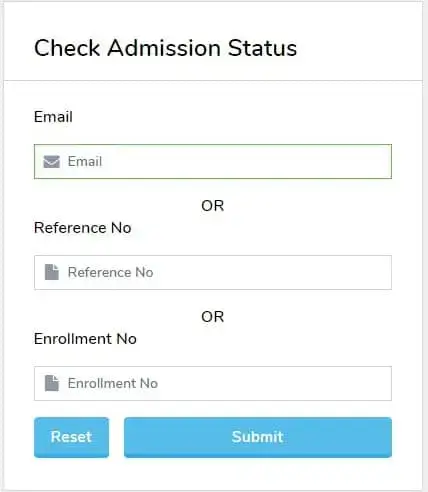
You can check it from your phone or computer. Follow these steps:
- Go to the official portal: sdmis.nios.ac.in
- Open the menu (you will see it on the right side of the screen).
- Click on Admission Status.
- Type your email ID or reference number.
- Click Submit.
- Your application summary will open on the screen.
If you cannot find your reference number, do not worry. Log in with your registered email ID and open My Details. Your reference number is shown there. It is also in the email you got when you submitted the form.
Note: This website is not the official NIOS website. We only explain the process. All your data is checked only on the official NIOS portal.
What does each NIOS admission status mean?
The status you see on the screen tells you exactly where your form stands. Here is what each one means and what you should do.
| Status | What it means | What you should do |
|---|---|---|
| Document Verification in Progress | NIOS is checking your documents | Wait. Check again after a few days |
| Confirmed | Your admission is approved | Download your ID card |
| Submission Pending | Your fee is not paid or the form is not submitted | Complete the payment and submit the form |
| Document Required | A document is missing or unclear | Log in, read the comment and upload it again |
| Rejected | Your documents were not accepted | Contact your Regional Centre |
If your status is Confirmed, you will get your enrollment number and ID card. You can read how to download it here: How to download NIOS ID card.
Why is my NIOS admission status still pending?
Most students see “pending” for one of these three reasons.
1. Document Verification in Progress

This is the most common reason. Your documents are reviewed before the admission is confirmed, so the status may remain pending for some time, so it takes time.
Once the check is done, your status changes to Confirmed by itself. You do not need to do anything.
Waiting time is not fixed. It can be a few days, and in busy admission months it can take longer. Keep checking once every few days.
2. Submission Pending
If you filled the form but did not pay, the dashboard shows Submission Pending. Log in, finish the payment, and submit the form.
If you haven’t applied yet, read our Complete NIOS Admission 2026 Guide before submitting your application.
3. Document Required

If your application is missing a document or one of the uploaded files is unclear, the portal may display “Document Required.”
When this happens, log in to your NIOS student dashboard and read the comment carefully. The dashboard will explain which document needs to be uploaded.
Common dashboard comments and how to fix them
Many students apply and then wait for months, for example: “I applied two months ago, but my NIOS admission status is not updating.
What should I do?” First, open your dashboard and read the comment. These are the most common ones:
| Comment on dashboard | What to do |
|---|---|
| Specimen signature not found | Upload a clear scan of your signature |
| Incomplete Aadhaar | Upload the full Aadhaar card, including the address side |
| Incorrect address proof | Make sure the address in your form matches the proof you upload |
| Original marksheet required | Upload a scan of your failed marksheet (for TOC) |
| Passed candidate is not allowed full admission | If you have already passed, you can only take part admission, with a maximum of 4 subjects |
| 12th fail marksheet or admit card | Upload the admit card from your parent board, or your on-demand admission will not be confirmed |
Tip: Scan every document in good light, keep all four corners visible, and upload it in the size NIOS asks for.
If your status does not change for a long time
- Only a few days have passed: Wait and check again after a few days.
- It has been unchanged for an unusually long time: Read the dashboard comments first. If there is no comment, contact your Regional Centre. Keep your reference number and a screenshot of your status ready when you call or write.
What to do after your admission is confirmed
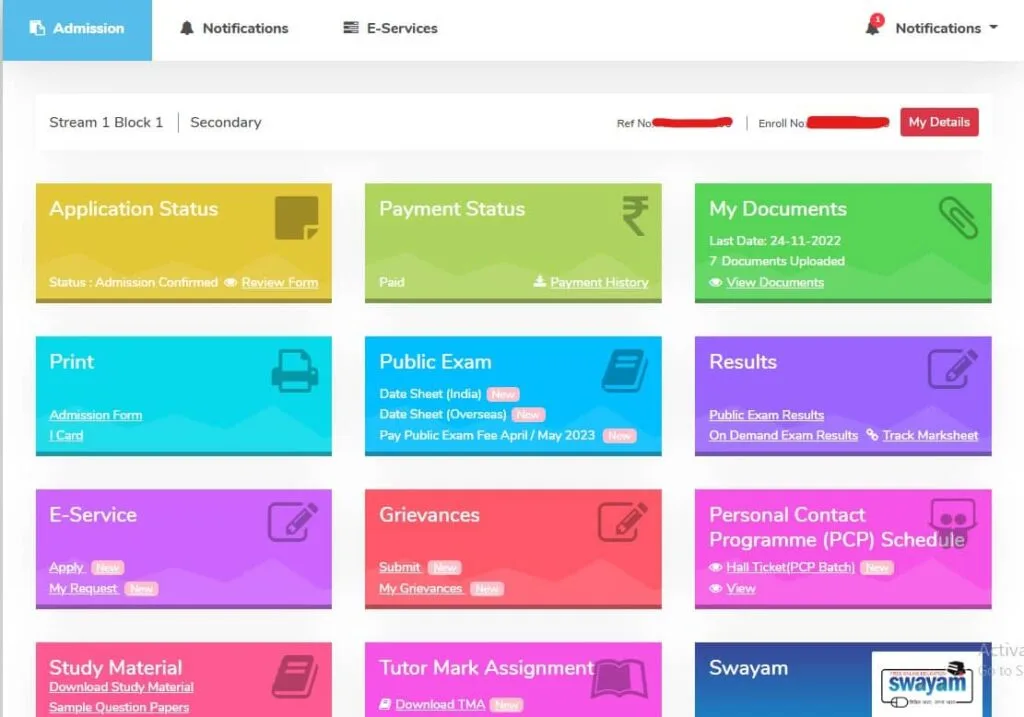
When your status shows Confirmed, do these things in order:
- Download your ID card.
- Send your original failed marksheet to NIOS, if you took TOC.
- Download the study material in PDF.
- Complete your TMA (assignments).
- Contact your study centre for PCP classes.
- Pay your exam fee when the exam form opens.
FAQ
Conclusion
Checking your NIOS admission status is easy. Use your reference number or email on the official SDMIS page, read the status, and take the step it suggests.
If your status is pending, give it some time and make sure your fee is paid and all documents are clear. Once your admission is confirmed, download your ID card and meet your study centre for PCP classes.
For the latest rules and updates, always use the official NIOS website.
Ansari Sir is an experienced education professional with over 20 years of expertise in distance and open education systems. He holds a Post-Graduation in Distance Education and has helped thousands of students. He is also an Empaneled Career Counsellor with the National Career Service (NCS), Government of India, and provides trusted, experience-based guidance for students.
how much day of document verification progress
i can’t reupload my document.
2 month complete by nios admission ..but documents verification progress …thats my problem
Same bro
I have applied a month before for Stream 1 but my admission is still not confirmed what should i do
Hello dear team,
I have just applied for the nios exam for TOC. Now my important query is that it was on first over online admission page asked the identity type and identity no. I’ve chosen birth certificate and identity no I’ve given the S.I no of the birth certificate.And later i saw that Aadhar was not marked necessary as like the other, so I’ve not given aadhar details. I’m much frightened that will my admission will get cancelled?! How can I change will they request us to change those if so we done some minor mistakes.Please I’m hoping for a positive and sooner reply.
I have just applied for the nios exam for TOC. Now my important query is that it was on first over online admission page asked the identity type and identity no. I’ve chosen birth certificate and identity no I’ve given the S.I no of the birth certificate.And later i saw that Aadhar was not marked necessary as like the other, so I’ve not given aadhar details. I’m much frightened that will my admission will get cancelled?! How can I change will they request us to change those if so we done some minor mistakes.Please I’m hoping for a positive and sooner reply.
Don’t worry about your admission status, birth certificate is also a valid documents.
Great post! The step-by-step guide on checking the NIOS admission status was really helpful. I appreciate the tips on what to do next, especially about the documents needed for the next steps. Thanks for sharing this information!
Thank you for the detailed guide on checking the NIOS admission status! I found the step-by-step instructions really helpful. I was worried about the next steps, but now I feel more confident about what to do. Looking forward to your next post!
Thanks for sharing this informative post! The step-by-step guide on checking the NIOS admission status is super helpful. I’ve been waiting for updates, and your tips on what to do next are just what I needed. Looking forward to more posts like this!
Thank you for the detailed guide on checking the NIOS admission status! It was really helpful, especially the tips on what steps to take next. I appreciate the clarity you’ve provided; it made the process feel less overwhelming. Looking forward to more updates!
Thanks for the detailed guide on checking the NIOS admission status for 2025! It’s really helpful to know the steps to take next. I appreciate the tips and insights you provided. Looking forward to the next updates!
Thank you for the detailed guide! I found the steps for checking the NIOS admission status very helpful. Just a quick question—what should I do if I encounter any issues while checking my status?
when my document will be verified it is still under process i have to speed post pls share the date and reply